

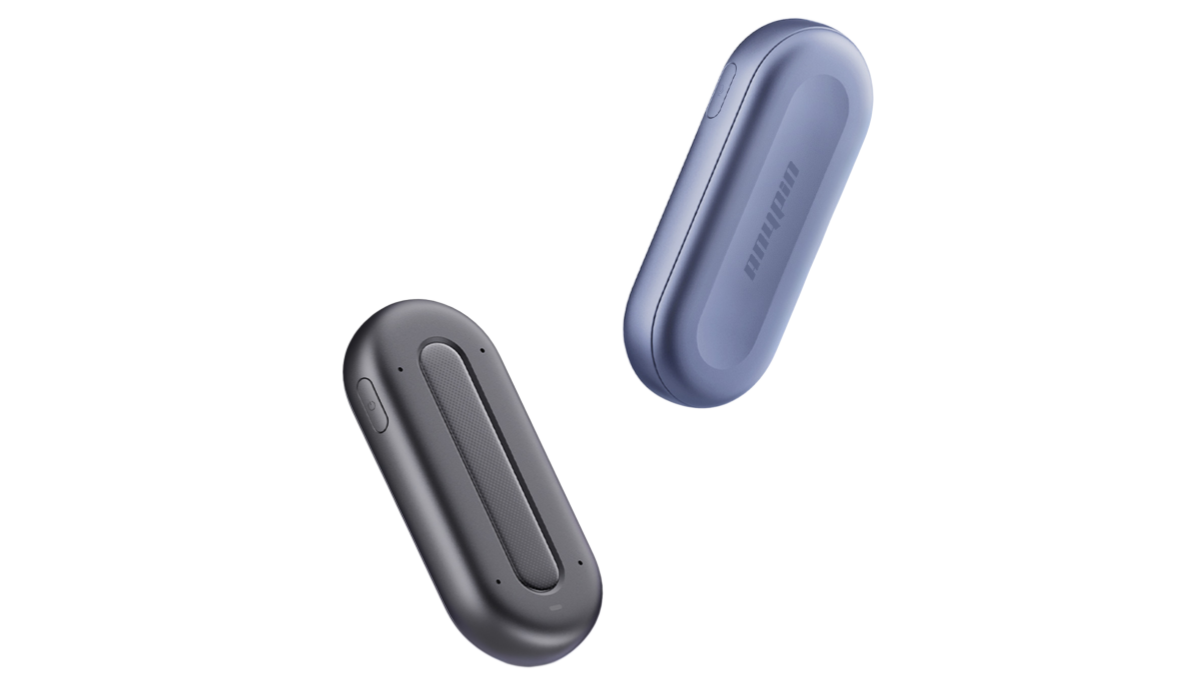



Best Meeting Voice Recorder and Lecture Recording Device: Matching the Device to Your Space
The best meeting voice recorder is not necessarily the recorder with the longest battery life or the largest number of features. In real-world use, the physical environment often determines whether a recording is genuinely useful.
A university lecture, seminar, project meeting, interview, and client discussion all have different acoustic layouts. Sometimes one person speaks from a fixed position. Sometimes several people move around a table. In other situations, the user needs to move while recording.
This makes the relationship between device placement, speaker position, and recording workflow particularly important. Instead of asking only what a recorder can do, users should ask where it will be used and how the conversation actually happens.
Recording Environment Should Shape Your Device Choice
A traditional lecture recording device is often designed around a relatively simple assumption: the recorder stays in one place while the lecturer speaks.
That approach can work well in a small classroom, but modern academic and professional situations are less predictable. A seminar may involve students asking questions from different seats. A meeting may shift between several speakers. A researcher may need to move between participants during an interview.
The following comparison illustrates why the environment matters:
Why Device Position Can Change the Recording?
Two recorders with similar specifications can produce different results simply because they are positioned differently.
A smartphone placed inside a bag, for example, may be physically close to the user but acoustically blocked. A traditional recorder placed at the end of a conference table may be far away from some participants. A wearable device can move with the user and maintain a relatively consistent relationship with the main speaker.
This is one reason wearable recording has become an interesting alternative to conventional handheld devices.
ANYPIN Note Pod P1 is designed for wearable use, allowing users to attach the device to clothing or wear it around the neck. ANYPIN also positions the product as an AI recording and note-taking device rather than a conventional audio recorder.
For users comparing an AI pin recorder with a conventional digital recorder, the key difference is therefore not only size. It is the way the hardware fits into the user's physical workflow.

The Best Digital Recorder for Lectures May Depend on Classroom Size
Large Lecture Halls
In a large lecture hall, distance becomes the main challenge. The lecturer may be several rows away, while questions may come from different parts of the room.
A suitable best device to record lectures should prioritize clear speech capture and consistent microphone performance. Students should also consider where the device can be placed without obstructing their normal note-taking.
The University of Oregon's Accessible Education Center recommends testing recording distance and reducing background noise when preparing technology-assisted lecture recordings. Its guidance also notes that students should position themselves appropriately in relation to the instructor.
Small Classrooms
Small classrooms generally create shorter distances between the recorder and speaker. In this environment, a compact device may be more convenient than a larger professional recorder.
If students frequently switch classrooms, portability becomes particularly important. A device that can be attached to clothing can eliminate the need to occupy desk space.
Seminars and Discussion-Based Classes
Seminars are different because students may become the primary speakers. A recorder designed only around one forward-facing voice may not be ideal when several people contribute.
This is where multi-microphone capture and AI speaker identification can become useful. Instead of producing one undifferentiated block of text, an AI system can help distinguish different voices during transcription.
When a Meeting Recorder Needs to Move With You
Meetings are often treated as table-based activities, but many professional conversations are not.
Consider a product manager walking through a workspace with an engineer, a researcher conducting interviews, or a consultant moving between participants during a workshop. Holding a smartphone throughout the discussion is inconvenient, while placing a recorder on a table may create distance from the active speaker.
This is where the physical design of a best AI voice recorder for meetings becomes relevant.
A wearable AI recorder can reduce the need to repeatedly reposition the device. For users who alternate between meetings, interviews, lectures, and informal discussions, this can create a more consistent recording workflow.
What Is the Best AI Recorder for Mixed Academic and Professional Use?
For users who attend university while also working on research, internships, or professional projects, a recorder may need to serve several purposes.
A conventional digital recorder mainly produces an audio file. An AI recorder can add another layer by converting recorded speech into text and organizing that information.
ANYPIN's product ecosystem combines recording with AI-based transcription, summaries, speaker-related information, and searchable content. This makes the best AI voice recorder less about the audio file itself and more about what the user can do with the recording afterward.
A single device can potentially support:
Lecture recordings
Research interviews
Study-group discussions
Team meetings
Project reviews
Professional conversations
The important distinction is that the device does not have to be selected exclusively for one environment.
Pod Note or AI Recorder? Look at the Complete Workflow
Users searching for best AI voice recorder may encounter products that focus heavily on individual features.
A better comparison starts with the workflow:
Capture → Process → Find → Review → Act
A recording is the first stage. Transcription makes spoken content searchable. Topic organization helps separate different sections. AI summaries can reduce the amount of material that needs to be reviewed manually.
This workflow is particularly useful for long lectures and meetings because users often remember the general topic but not the exact moment when something was discussed.
For students, searchable transcripts can help locate an explanation without replaying an entire lecture. For professionals, the same approach can make it easier to revisit a discussion point without manually scanning a lengthy meeting recording.

Is ANYPIN a Practical Option for Lectures and Meetings?
ANYPIN Note Pod P1 is positioned between a conventional recorder and an AI productivity tool. Its wearable form allows users to keep their hands free, while its recording system can support transcription in more than 120 languages, summaries, speaker-related information, and searchable AI functions.
For someone comparing the best recorder to record lectures, the main consideration should be whether this combination matches the way they actually work.
If the user moves frequently, switches between academic and professional environments, and wants more than an audio archive, the wearable AI approach offers a different workflow from a traditional handheld recorder.
The final choice should still be based on classroom rules, recording conditions, required battery life, privacy requirements, and whether AI processing is genuinely useful for the user's routine.
FAQ
What is the best voice recorder for class lectures?
The right device depends on classroom size, speaker distance, portability, and whether transcription is required. Large lecture halls may place greater demands on microphone pickup, while seminars require effective multi-speaker capture.
What is the best digital recorder for lectures?
A traditional digital recorder can be suitable when users primarily need reliable audio storage. Those who need searchable transcripts and AI-generated summaries may prefer an AI-enabled device.
What is the best AI recorder for meetings?
Look for clear audio capture, multi-speaker support, portability, transcription, speaker identification, and useful post-recording organization. Meeting policies and participant consent should also be considered.
Is an AI pin recorder suitable for lectures?
A wearable recorder can be convenient for lectures because it does not require the user to hold a phone or occupy desk space. The appropriate placement still depends on classroom acoustics and institutional recording rules.
What is the best device to record lectures if I move between classrooms?
Portability becomes especially important. A compact device that can be clipped or worn can be easier to carry and deploy than a larger tabletop recorder.
Can ANYPIN be used for both lectures and meetings?
ANYPIN is designed for multiple recording scenarios, including lectures, interviews, and meetings. Its AI-oriented workflow can combine recorded audio with transcription and other post-recording functions.
Article credit: Heidi Cohen (https://heidicohen.com/use-blog-to-sell/)



