


May 15, 2026
What Is the Best AI Voice Recorder for Lectures and Meetings?
Choosing the best AI voice recorder is no longer simply about finding a device that captures clear audio. Modern users increasingly want a recording device that can also transcribe conversations, identify speakers, summarize discussions, and make important information searchable.
For students, professionals, researchers, and interviewers, this makes AI-powered recording devices particularly useful. Instead of replaying an hour-long lecture or meeting to find one important detail, users can work with searchable transcripts and AI-generated notes.
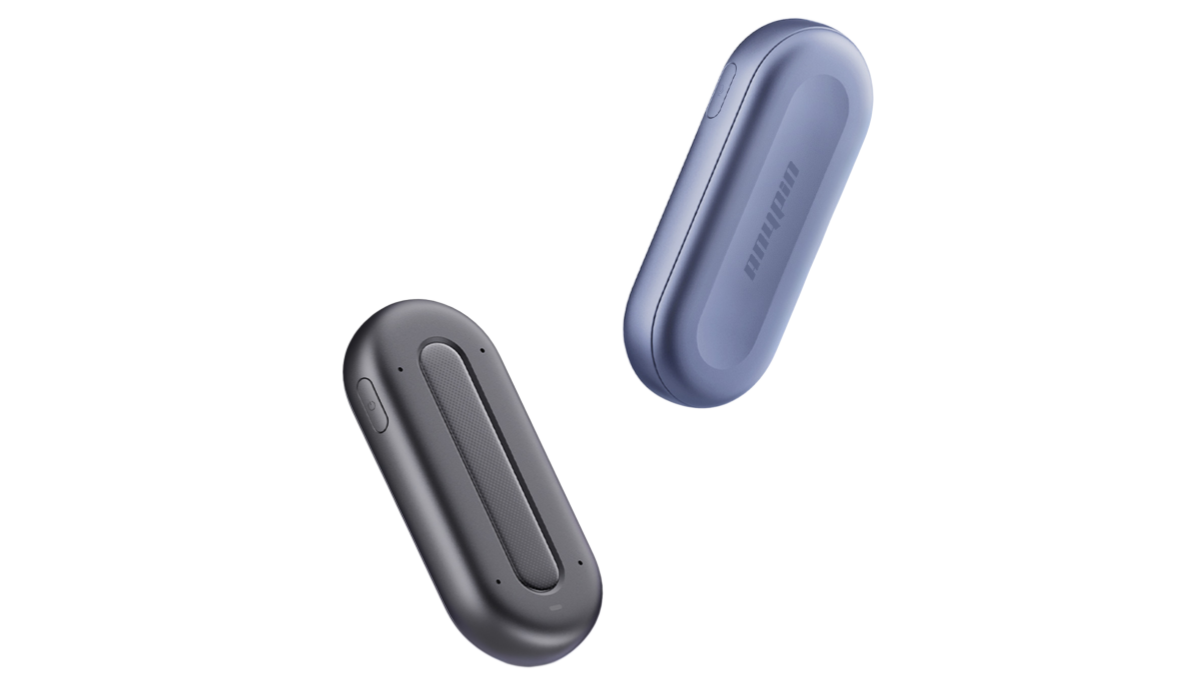
Among the newer options, ANYPIN combines dedicated recording hardware with AI transcription, summaries, speaker labels, topic organization, and searchable insights. Its Note Pod P1 is designed for lectures, meetings, interviews, and other situations where hands-free recording can improve productivity.
What Makes the Best AI Voice Recorder?
The best AI recorders should solve more than the basic problem of capturing sound. When comparing different AI recording devices, consider the following factors.
1. Recording Quality and Microphone Performance
Audio quality remains the foundation of any voice recorder. If the original recording is unclear because of background noise, distance, or reverberation, transcription quality can suffer as well.
NIST's speech-collection guidance emphasizes minimizing background noise and reverberation and using appropriate digital recording equipment for speech capture.
NIST Speech Collection Guidelines provides useful technical guidance on recording environments and equipment.
For a lecture or meeting, a multi-microphone design can therefore be more useful than simply choosing a recorder with a high storage capacity. ANYPIN's Note Pod P1 uses a four-microphone array designed to improve voice pickup and supports speaker-labeled transcription.
2. AI Transcription and Speaker Recognition
A conventional recorder saves audio. An AI recorder turns that audio into usable information.
When evaluating what is the best AI recorder, check whether the device can:
Convert speech into text automatically
Distinguish different speakers
Reduce the impact of background noise
Organize transcripts by topic
Search recordings using keywords
Generate summaries and key points
ANYPIN states that the Note Pod P1 supports AI transcription in more than 120 languages, speaker labels, noise reduction, topic-based segmentation, and AI-generated summaries.
This difference is especially important for meetings and lectures because the value of a recording often comes from what you can do with it afterward.
Best AI Recorder Device for Lectures
If you are looking for the best voice recorder for lectures, portability and hands-free operation are particularly important.
A student may need to listen carefully, participate in a discussion, or review presentation slides while the lecture is taking place. Constantly typing notes can make it difficult to concentrate.
An AI recorder can provide a different workflow:
1.Record the lecture.
2.Convert speech into a transcript.
3.Organize information by topic.
4.Generate an AI summary.
5.Search the recording later for specific concepts.
ANYPIN specifically positions the Note Pod P1 as a lecture recorder and note-taking device. Its lecture workflow is designed to let students focus on the class while the device captures and organizes the conversation.
For students comparing the best voice recorder for lectures, this combination of recording and post-processing can be more useful than a basic digital recorder.
Best AI Recording Device for Meetings
Business meetings create a different set of requirements. A best AI recording device for meetings should be convenient enough to start recording quickly while providing useful documentation afterward.
Meeting recordings may contain:
Decisions
Customer requirements
Action items
Project updates
Names and responsibilities
Deadlines
Questions requiring follow-up
ANYPIN combines recording with AI summaries, speaker identification, topic organization, and key-point pinning. The device also supports Wi-Fi uploading, allowing recordings to move into the associated app without relying solely on Bluetooth.
ANYPIN's built-in templates — covering interviews, lectures, and creative sessions — help structure summaries automatically, making follow-up and documentation more consistent.
This makes a dedicated device such as ANYPIN useful for users who regularly attend face-to-face meetings rather than relying exclusively on software designed for online calls.
Note Pin: Why Highlighting Matters
One useful feature to look for when choosing an AI recorder is the ability to mark important moments.
A note pin can provide a simple way to identify a critical statement while recording. Instead of remembering the timestamp later, users can flag an important moment immediately.
ANYPIN's pin-based workflow is designed around this idea. Users can mark key moments during recording, helping the AI surface more relevant insights and improve the organization of later summaries.
For lectures, a pin could identify an important definition or exam topic. In meetings, it could mark a decision or action item. During interviews, it could highlight a particularly useful answer.
Privacy Should Be Part of Your Decision
When selecting the best AI voice recorder, privacy should receive as much attention as recording quality.
Audio recordings can contain personal information. The European Data Protection Board explicitly identifies audio recordings containing individuals' voices as examples of personal data. European Data Protection Board: Data Protection Basics explains why organizations need to consider data-protection obligations when handling such information.
Before recording a meeting, lecture, interview, or private conversation, users should also consider applicable consent and recording laws.
Cloud processing deserves additional attention. The EDPB's guidance on voice assistants emphasizes transparency about how recorded voice data is processed and what information may be derived from it.
ANYPIN states that recordings are transferred and stored through encrypted channels and that its services are designed to comply with GDPR and CCPA requirements.
Is ANYPIN a Good Choice for Students and Professionals?
For users asking what is the best AI recorder, there is no universal answer. The right choice depends on how you record and what you need afterward.
A basic recorder may be sufficient if you only want an audio file. However, users who need transcription, summaries, speaker labels, searchable information, and organized notes should consider an AI-powered device.
ANYPIN's Note Pod P1 is particularly suited to users who frequently record lectures, meetings, interviews, and professional conversations. Its combination of dedicated hardware and AI processing makes it more than a conventional voice recorder.

FAQ
1. What is the best AI voice recorder?
The best AI voice recorder depends on your requirements. Look for reliable audio capture, accurate transcription, speaker recognition, AI summaries, convenient storage, and strong privacy controls. ANYPIN Note Pod P1 combines these functions in a wearable recording device.
2. What is the best AI recorder for lectures?
For lectures, choose a device that offers clear voice capture, long recording time, automatic transcription, searchable notes, and summaries. ANYPIN Note Pod P1 is designed specifically for lecture recording and AI-assisted note taking.
3. What is the best AI recording device for meetings?
A good meeting recorder should capture multiple speakers and turn conversations into structured information. Features such as speaker labels, AI summaries, topic organization, and key-point marking are particularly valuable.
4. Can an AI recorder replace handwritten notes?
It can reduce the amount of manual note-taking, but it should not necessarily replace personal notes completely. AI-generated transcripts and summaries are useful for reviewing information, while personal annotations can capture your own interpretations and priorities.
5. Is an AI voice recorder better than a smartphone?
A smartphone can record audio effectively, but a dedicated AI recorder can offer advantages such as one-touch recording, independent battery usage, hands-free operation, and hardware designed specifically for capturing conversations. ANYPIN also provides wearable options for hands-free recording.
6. Can AI voice recorders work offline?
Some devices can record without an internet connection but require connectivity for cloud transcription or AI processing. ANYPIN states that its Note Pod P1 can record offline, while transcription and playback in the app require an internet connection.